Healthcare
Template
Healthcare Marketing Asset Management: The Complete Guide for Multi-Site Teams
Tips in keeping approved healthcare marketing materials consistent, findable, and controlled across every location.


Topics
Creative Workflows
AI & DAM
Abstract
Brand and patient-facing assets include logos, templates, campaign materials, education handouts, waiting-room content and website imagery. Managing them across multiple locations requires one searchable library, clear ownership, defined review routes and access based on what each person needs to do. This article covers how to keep your marketing and communications assets consistent and easy to access.
The adoption of technology becomes essential as healthcare systems generate and manage increasing volumes of digital content. This means the need for an effective organization beyond a folder drive and secure access is crucial.
The problem might not be an emergency at first glance, which is why it spreads. A lean central team creates and approves content for many locations, while local staff need answers quickly. If an approved file is hard to find, each clinic creates its own workaround.
What counts as a brand or patient-facing asset?
In this article, brand assets include logos, templates, photography, campaign creative and presentation materials.
Patient-facing assets are communications that patients may read, watch or use, such as education handouts, appointment-preparation materials, waiting-room screens and public website content.
Start with one approved source
A shared library should answer a basic question: which version can a location use today?
Operational efficiency is the goal and administrative complexity could only backfire the efforts of setting a new library in place.
Give each reusable asset a visable status such as draft, in review, approved, or retired. Only approved material should appear in the default view used by clinic staff.
The file also needs enough context to stand on its own. Record the content owner, approval date, next review date, intended audience, applicable location, or program, language, and any limits on use.
This is the foundation of managing healthcare marketing assets: staff get one dependable answer without waiting for the central team to search on their behalf.
Keep every location on the same approved brand
Brand drift usually starts with access. For example, a clinic creates its own sign or flyer without using the right brand assets because it's hard to locate the official version.
The solution? Have a small, usable set of current materials fit into a category and organize the assets around the activities the locations perform: promoting a service, announcing an event, updating waiting-room information, or preparing for social post.
Staff should be able to find the right template without knowing the marketing team's folder structure.
Variation will always be necessary. A clinic may need its own address, phone number, service list, or language. Separate the elements that may change from those that must remain fixed. A locked template can protect the logo, type hierarchy, and required wording while leaving a defined area for local details.
Detailed rules become more useful when the approved files sit beside them. Our guide to healthcare brand guidelines explains how to build that living reference.
Treat clarity as part of asset quality
A handout can be on-brand but it's important to review the message as well as the design to avoid misunderstandings.
The CDC Clear Communication Index provides research-based criteria for assessing public communication materials. If you need to double check whether written and audiovisual materials are actionable and understandable, check out the AHRQ Patient Education Materials Assessment Tool.
Both are useful when it comes to teams defining their own review criteria.
For digital materials, accessibility belongs in the same workflow. The Web Content Accessibility Guidelines cover text, images, audio, and other web content. Store accessibility information with the asset where possible, including approved alt text, captions, or transcripts.
Route the right work to the right person
Define the route by asset type before work begins because not every asset needs the same path. The requester should know who reviews it, in what order, and who makes the final call.
Reviewers should access the file, the intended audience, the channel, and the locations affected as well as the deadline in one place.
Keep feedback attached to the asset instead of sending little notes on email and chat. Once the asset is approved, preserve that version and its decision history. A later edit should create a new version rather than overwrite the record of what was cleared.
The general content approval process provides a broader workflow. If you want the specific article based on healthcare, read more about marketing approval reviews as it shows you how to assign ownership across clinics without requesting a long chain of feedback.
Plan for updates before assets go live
Patient-facing information can change. Services move, phone numbers become different, campaigns can end, and translations can need revision. Add an owner and review date when the asset is approved.
An expired asset also needs a clear outcome. It can remain in the historical record while disappearing from search results and external portals or if a replacement exists, link the old version to the new one to maintain version control.
How contentcloud supports the workflow
contentcloud gives healthcare marketing teams one place to organize brand and patient-facing materials, add searchable metadata, control access and keep review activity with the asset. AI-assisted tagging can reduce manual description work, while the team retains control over approval status, permissions and use.
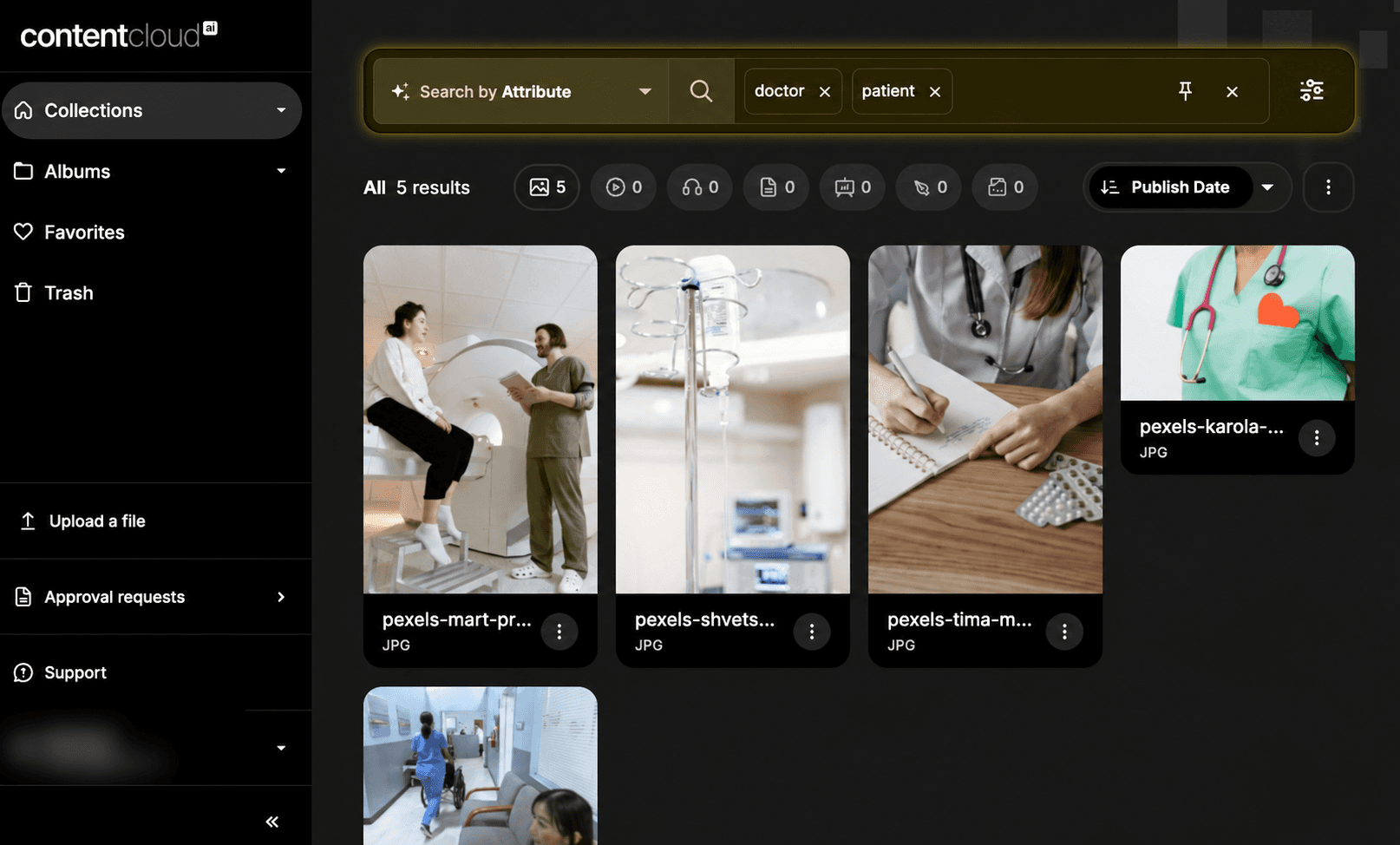
A clinic employee searches for approved visual assets that can be used for a flyer and sees the updated visuals that are applicable.
A reviewer sees the draft, comments and decision history.
The marketing team can retire an old asset without deleting the record.
Explore contentcloud for healthcare to see how the workflow can support a distributed marketing team.
What counts as a patient-facing asset in healthcare marketing?
How should a multi-site healthcare team keep its brand consistent?
Who should review patient-facing marketing materials?
Does a healthcare marketing team need a compliance platform or a DAM?
Does a healthcare marketing team need IT support to set up a DAM?


Let’s keep in touch.
Discover more about Digital Asset Management & Brand Design. Follow us on Twitter and Instagram.


